CRAIG’S ROAD-TRIP LESSONS
Five lessons from a
12,318-mile Tesla road trip.
A road trip is the ultimate no-home-charging experience. Even if you normally plug in every night, that charger stayed home.
Maybe your hotel has charging. Otherwise, you’re making the same decisions I make every day: where to charge, how much energy to buy, and whether that gets you where you need to go next.
After 12,318 miles across 32 states, these are the lessons I’d take into another trip.
01 Plan beyond the hotel
Before stopping for the night, know how you’ll reach your next charge.
Getting to the hotel isn’t the whole plan. You also need enough energy to leave the next morning and reach charging along your planned route.
My preferred approach is to include the hotel as an intermediate stop and extend the planned route through the next day’s first Supercharger. Then inspect the projected reserve at the hotel and the continuing trip.
Alternatively, if you’ve already worked out the planned energy requirement, you can use the hotel as the final destination and set an appropriate arrival-energy target. The important part is doing that calculation first—not assuming a comfortable-looking percentage will be sufficient.
There isn’t one hotel-arrival percentage that’s right for every day. It depends on what comes next, the available charging, and what the car will consume while parked.
What happened in Cody
On September 4, we were in Cody, Wyoming, preparing to drive through Yellowstone toward the Supercharger in West Yellowstone, Montana. The car showed 137 miles remaining. The direct route projected only two to five miles remaining upon arrival at the Supercharger.
In that situation, Tesla wasn’t showing us a Supercharger within an acceptable margin. We were fortunate to find a local third-party charger to fill the gap.
That was a valuable lesson: displayed miles alone didn’t settle whether our next leg was a sensible plan.
We did not establish that overnight battery consumption caused this shortage. What we established was that the projected reserve wasn’t enough to proceed comfortably.
Before you call today finished, make sure you know how tomorrow starts.
02 Know what stays on after you walk away
Minimize energy use you don’t need—but understand the tradeoffs before switching things off.
People without home charging notice parked consumption pretty quickly. You didn’t drive anywhere, but the next morning some of your energy is gone.
On a road trip, that matters too—particularly when those miles are needed to reach the next charger.
The goal isn’t zero consumption. The car has normal background needs. The goal is to avoid leaving equipment or features operating unintentionally.
The laptop lesson
I brought a laptop so we could keep working while traveling. We used a DC-to-AC converter and left accessory power enabled so the computer could remain available when we were away from the car.
Unplugging the laptop didn’t switch off the arrangement. The converter remained connected, and we eventually traced a fan noise to it.
Tesla also documents that Keep Accessory Power On increases vehicle consumption even when no device is being powered or charged.
We didn’t measure the converter’s consumption separately from the vehicle’s. But I learned to check both the equipment and the setting—not just whether the laptop was plugged in.
Your overnight energy checklist Power, climate, schedules and apps
- Accessory power: Turn off Keep Accessory Power On when nothing needs it.
- Sentry Mode: Decide whether you want the surveillance enough to accept its energy use. An Exclude Home setting doesn’t necessarily cover your hotel.
- Summon standby: Check whether you need quicker readiness. It can consume additional energy while active, although automatic suspension rules mean it isn’t literally running continuously.
- Climate: Check Keep Climate On, Camp Mode, Pet Mode, and Cabin Overheat Protection. The No A/C option can still run a fan.
- Schedules: Look for unwanted or mistimed preconditioning. Keep preparation you need; eliminate accidental runs.
- Remote climate: Don’t start heating, cooling, or defrosting much earlier than necessary.
- Apps and integrations: Avoid unnecessary commands or live-camera sessions. Check whether third-party tools allow the car to sleep; don’t assume every logger is a problem.
- Extra equipment: Understand the parked power needs of any refrigerator, separate camera, monitoring device, or other add-on.
- Finish and leave: End entertainment use, lock up, and let the vehicle power down normally.
This checklist assumes an empty car. Don’t disable climate needed by people or animals, or battery-protection systems.
If your software offers Low Power Mode, understand when it activates and what it disables. It’s a backstop, not a substitute for checking unnecessary loads before leaving.
Not every disappearing mile means the same thing
Cold can temporarily make some stored battery energy unavailable. That’s different from electricity consumed by equipment, although warming the battery, of course, uses energy.
For a useful overnight comparison, record battery percentage/miles and time when you park and again in the morning. Review the car’s parked-energy information from the Energy app, and note temperature and any features intentionally left operating. Personally, when I open the Tesla app, I want to see the car slept overnight. When it does wake up, I like to see a minimal difference between the previous night’s recorded miles and the new number.
03 Watch the predicted arrival reserve—not just the selected speed profile
Respond to a shrinking margin early, while you still have options.
On September 3, we drove from Spearfish, South Dakota, toward Miles City, Montana.
We had planned our charge, but Mad Max remained active during part of the drive. Our projected arrival reserve began shrinking.
The car’s warnings were extremely useful. Our screenshots show the progression:
| Distance remaining | Warning | Projected arrival charge |
|---|---|---|
| 142 miles | Stay below 69 mph | Above 4% |
| 122 miles | Stay below 68 mph | Above 3% |
See the original Miles City warnings
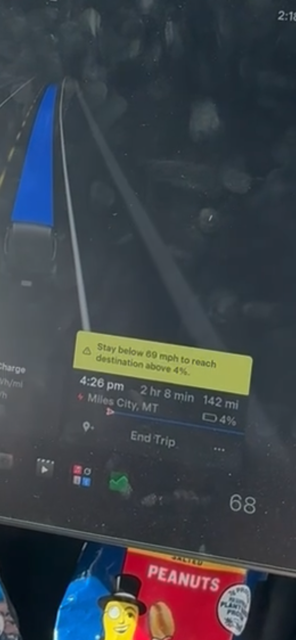
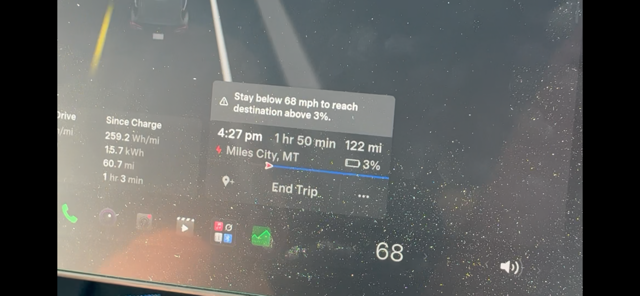
These were predicted arrival figures—not the battery percentage at that moment.
As the margin tightened further, I took over from FSD and drove at about 55 mph. We also raised the air-conditioning setpoint to reduce demand.
We reached Miles City with 2% battery and five displayed miles remaining.
That’s what happened. It’s not a target I recommend aiming for.
The lesson is to check the profile you’re actually using, watch the projected arrival charge, and respond before the situation becomes critical. Keeping FSD engaged is less important than choosing an appropriate speed and maintaining a workable energy reserve.
This episode also contributed to our manual-driving mileage. I estimate roughly 50 miles on this stretch were outside FSD, but that segment figure wasn’t separately measured.
04 Plan the sightseeing and the way out
Reaching the attraction is only part of the energy requirement.
A park entrance or visitor center may be your navigation destination, but it isn’t necessarily the end of your driving.
You might spend hours touring, visit several viewpoints, take a scenic detour, and then still have a substantial drive to charging.
This came up in our planning around Crater Lake, where driving around the lake can be part of the visit.
Include the sightseeing stops you intend to make and the planned route to charging. Don’t assume that having enough energy to reach the park means you’ve allowed enough for the whole outing.
The question isn’t simply:
“Can I get there?”
It’s:
“Can I get there, do what I came to do, leave, and reach my next charge?”
05 Keep a route in the trip planner in case you lose connectivity
We lost cellular service repeatedly during the trip, including in national parks.
In the situations we encountered, the car continued to navigate the planned route even after losing connectivity. Tesla states that “if a data connection is not available, onboard maps allow you to navigate to any destination”. However, the kicker is “you must enter the exact and complete address when navigating without a connection”.
At one point in our journey, we accidentally hit “end trip” when we had no connectivity. That of course wiped the planned route clean. Fortunately, at the time we knew where we were headed but I’m glad we didn’t have to fat-finger exact and complete addresses into navigation to continue our drive.
Our phones sometimes retained service after the car lost it, but there were also stretches when none of our devices had coverage. Having several devices wasn’t a guarantee.
My habit now is to keep a destination loaded, even when I already know where I’m going.
Software and circumstances can vary. This is what we experienced—not a promise about every Tesla in every offline situation.
Load the route while connected. If service disappears, don’t throw away the directions you already have.
What I’d do differently next time
None of this made me regret the trip. Quite the opposite—I’m already planning another one.
But I’d take these habits with me:
Plan beyond tonight’s hotel.
Know what stays powered while parked.
Watch the predicted arrival reserve and respond early.
Include sightseeing miles and the route back to charging.
Keep navigation loaded before service disappears.
These are one owner’s lessons from one massive road trip. They aren’t reasons to avoid traveling in an EV. They’re things that would have made our trip easier to plan—and a couple of moments considerably less exciting.
Works for me.
Sources and context
One owner’s 2026 trip. Vehicle features and menu names can vary by software and configuration.
Tesla: Maps and Navigation · Accessory power · Summon standby